Enhance Your Photo Editing with Smart AI Tools
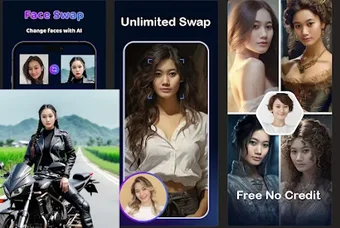
Remaker Face Swap AI is a creative photo and video editing app available on Android and iOS under the Remaker or RemakeFace brand. It focuses on AI-driven face swapping that lets users easily replace faces in photos or short videos. Designed for casual creators, social media users, and anyone exploring AI image editing, it combines automation with an intuitive interface that works well for beginners and experienced editors alike.
Top Recommended Alternative

Unlock Creativity with Flexible Face Swaps
Remaker enables multiple face swaps in a single image, making it ideal for group photos or playful edits. Its AI face detection and mapping produce fairly accurate results, maintaining good visual fidelity when lighting and angles align. While some premium features—such as high-resolution exports or video swaps—require a paid plan, the free version delivers solid performance for casual editing. Users can also enhance outcomes with built-in tools for upscaling, restoration, and background removal, helping photos appear sharper and more cohesive.
Fast, Simple, and Social-Ready
The app’s lightweight design makes importing, editing, and exporting photos quick and convenient. Users can pull images from their device or cloud sources, apply filters and adjustments, then share directly to social platforms or save locally. Processing speeds are generally fast, which benefits those creating content on tight timelines. Although ads and watermarks appear in the free tier, paid upgrades remove these limitations for a cleaner output.
Designed for Ease and Everyday Use
Remaker’s clean layout encourages smooth navigation and experimentation without technical clutter. Its user-friendly interface suits beginners who want simple swaps as well as creative users looking to combine edits. However, as with any cloud-based AI editor, privacy awareness is important when uploading personal images. Some results in complex scenes may show artifacts or mismatched tones, though overall accuracy remains competitive for a mobile tool.
A Quick, Creative Option for AI Editing
Overall, Remaker Face Swap AI provides a convenient way to create realistic face swaps and quick edits using AI technology. It is best suited for social media users and hobbyists seeking fun, fast visual transformations. Advanced users might want deeper editing control elsewhere, but for casual creative expression, it strikes a balance between simplicity, flexibility, and accessibility.